Pricing that protects your margins — automatically
Formula-based rules · Every plan · Auto price updates from Starter
Define your pricing logic once. Build the Drop applies it to every imported product and recalculates automatically when your supplier changes their price — so you never sell at a loss again.
Available on every plan, including Free
Formula
based pricing engine
Auto
recalculates on cost change
Free
rules on every plan
Stop recalculating prices product by product
Pricing dropshipping products by hand means a spreadsheet, a calculator and a lot of second-guessing. AliExpress costs change, shipping is easy to forget, and a single wrong price can turn a sale into a loss. As your catalogue grows from ten products to hundreds, keeping every price consistent with your target margin gets harder, and checking them one by one stops being realistic.
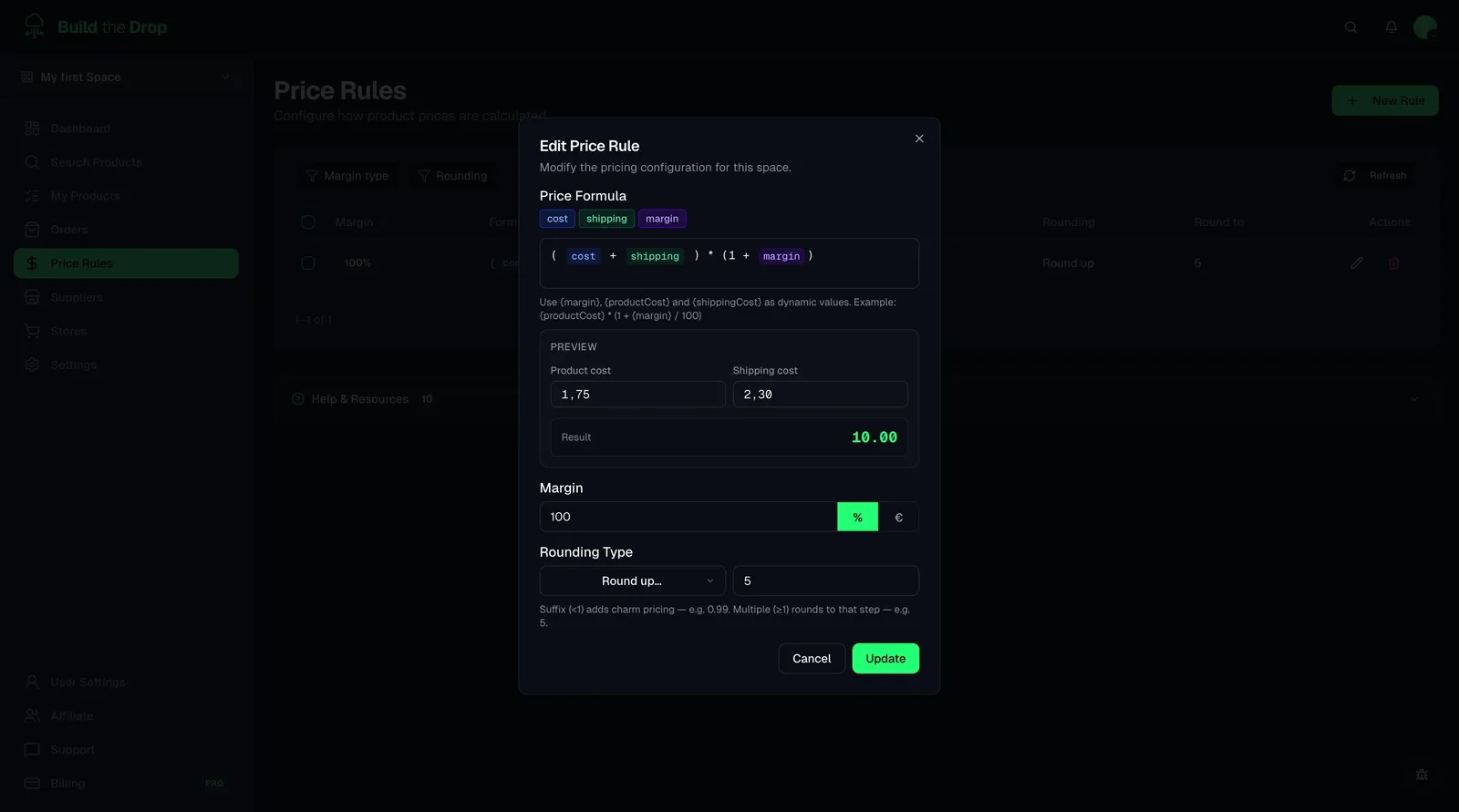
Build the Drop lets you write your pricing logic once as a price rule. A rule combines the product cost, the estimated shipping cost and your margin in a formula, with a percentage or fixed margin and a rounding mode (none, up, down or nearest). A live preview shows the result before you save. Each space has a default rule, you can preset a rule while searching so every import gets it, and individual products can override it with a custom price or markup.
You can create and use price rules on every plan, including Free. Automatic price updates are different: from Starter upwards, when a supplier cost changes, Build the Drop recalculates the price with your rule and updates it in Shopify during the regular sync. You can switch these updates off in the space settings if you prefer to manage prices yourself.
What you get with Smart Price Rules
All the tools you need, built into your dropshipping dashboard.
Formula editor — multiply, add, round
Build rules using multipliers (e.g. cost × 2.5), fixed add-ons (cost + $10), tiered margins by price range, and rounding options. All without writing code.
Automatic price updates
When AliExpress changes the cost of a product you've imported, Build the Drop recalculates the sale price in Shopify using your rule — automatically, with no action needed from you.
Several rules, one default
Create as many price rules as you need, for example one per niche or price range. Set a default rule for each space and pick a different one when you import a product.
Price range tiers
Apply different multipliers to different cost ranges. Products under $5 might need a 3× multiplier while premium items over $50 can work at 2×. Set it once, it applies forever.
How it works
Create a price rule
Go to Price Rules in your space and write your formula using product cost, shipping cost and margin, then choose how prices are rounded.
Assign it to products at import
When you import a product, select which price rule applies. The sale price is calculated instantly from the AliExpress cost.
Prices stay correct automatically
If the supplier cost changes, Build the Drop updates the Shopify sale price using your formula. Your margin is always protected.
Pricing strategies you can automate
Including shipping in the price
You offer free shipping to customers. A formula like (product cost + shipping cost) multiplied by your margin bakes the estimated shipping into every selling price automatically.
Clean, consistent price endings
You want prices that look deliberate rather than random decimals. Pick a rounding mode in the rule and every product in the space follows the same pattern.
Different markets, different rules
You run one space for Spain and another for the United States, each with its own currency and default rule. Products imported into each space are priced for that market.
Related guides
Price rules formula editor guide
Learn how to create pricing rules, use formula tokens, choose margin settings, apply rounding, and override prices for individual products.
Read guideHow to Do Dropshipping on Shopify with AliExpress [2026 Tutorial]
Complete tutorial to connect your Shopify store with AliExpress in 2026: finding suppliers, importing products and automating prices and order fulfillment.
Read guideFrequently asked questions
Stop setting prices manually
Create your first formula-based price rule and let Build the Drop handle your margins automatically.